Oussama Bougnouch | Principal Product Architect & Senior UX Lead

Wiggli: Centralizing the Hiring Process through Collaborative Scheduling

UX Designer | Focus: Scheduling Efficiency, Team Coordination, and Tool Consolidation
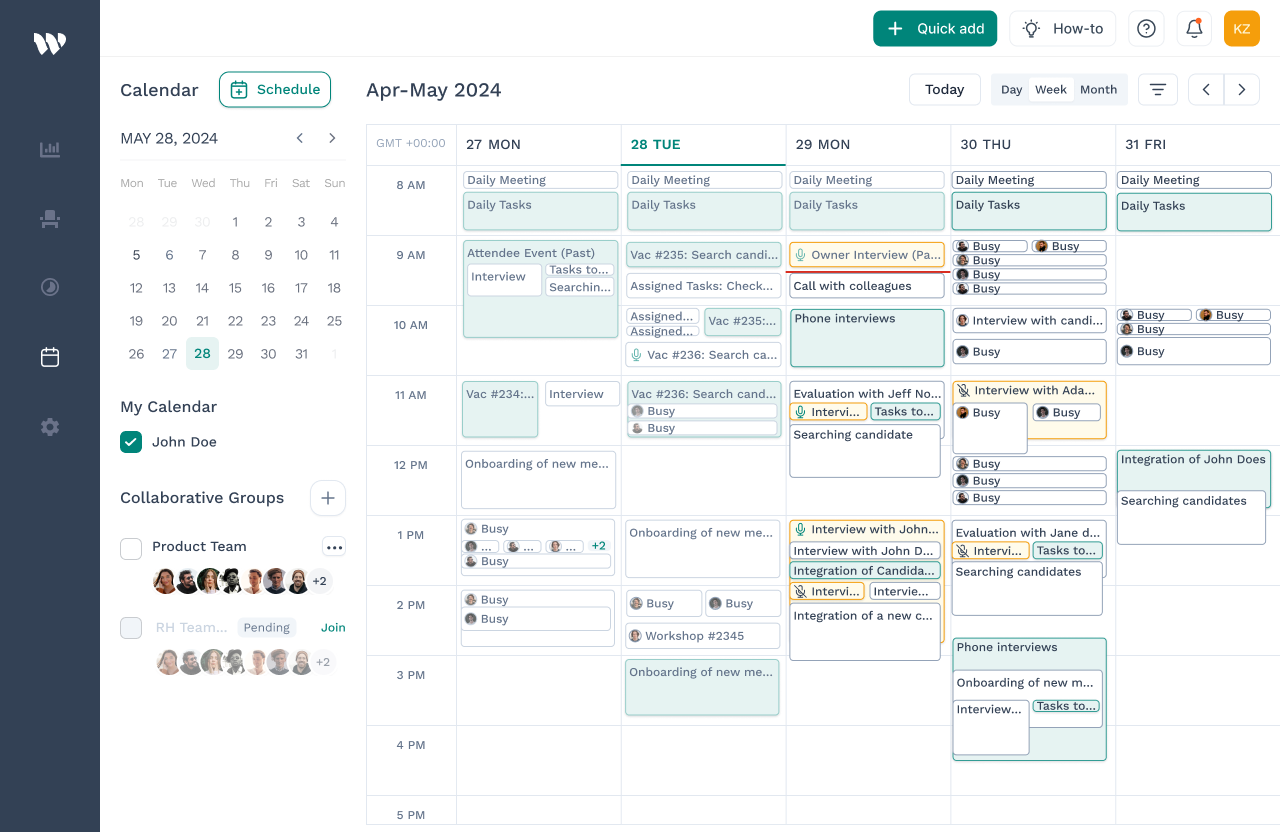
Wiggli collaborative scheduling calendar interface showing weekly view with interview events, Collaborative Groups panel, and team availability across multiple recruiters

The Discovery: Identifying Fragmented Communication causing a 40% candidate dropout rate.

In professional recruitment, speed is the only competitive advantage. At Gentis/Wiggli, we identified a critical failure in our production line: 40% of candidates were dropping out during the scheduling phase.

This wasn't just a "UX friction" issue; it was a massive financial leak. Every abandoned candidate represented thousands of dollars in wasted sourcing spend (CAC) and lost potential revenue. The process was manual, fragmented, and prone to human error. A recruiter would spend weeks sourcing a high-level "unicorn" candidate, only to lose them during a 3-day "email ping-pong" session.

1. Internal Research & Surveys

  • Quantitative: I used Mixpanel funnel analysis to track the candidate journey. The data was startling: 40% of candidates who reached the "Invite to Interview" stage never actually booked a slot. The drop-off happened exactly at the transition between the recruiter's email and the calendar view.
  • Qualitative: To define the scope, I conducted a survey with 23 Hiring Managers at Gentis. This was supplemented by a deep-dive interview with 4 Hiring managers from different experience levels, including Sarra, a Sr. Hiring Manager with 8+ years of experience, to map the current journey.
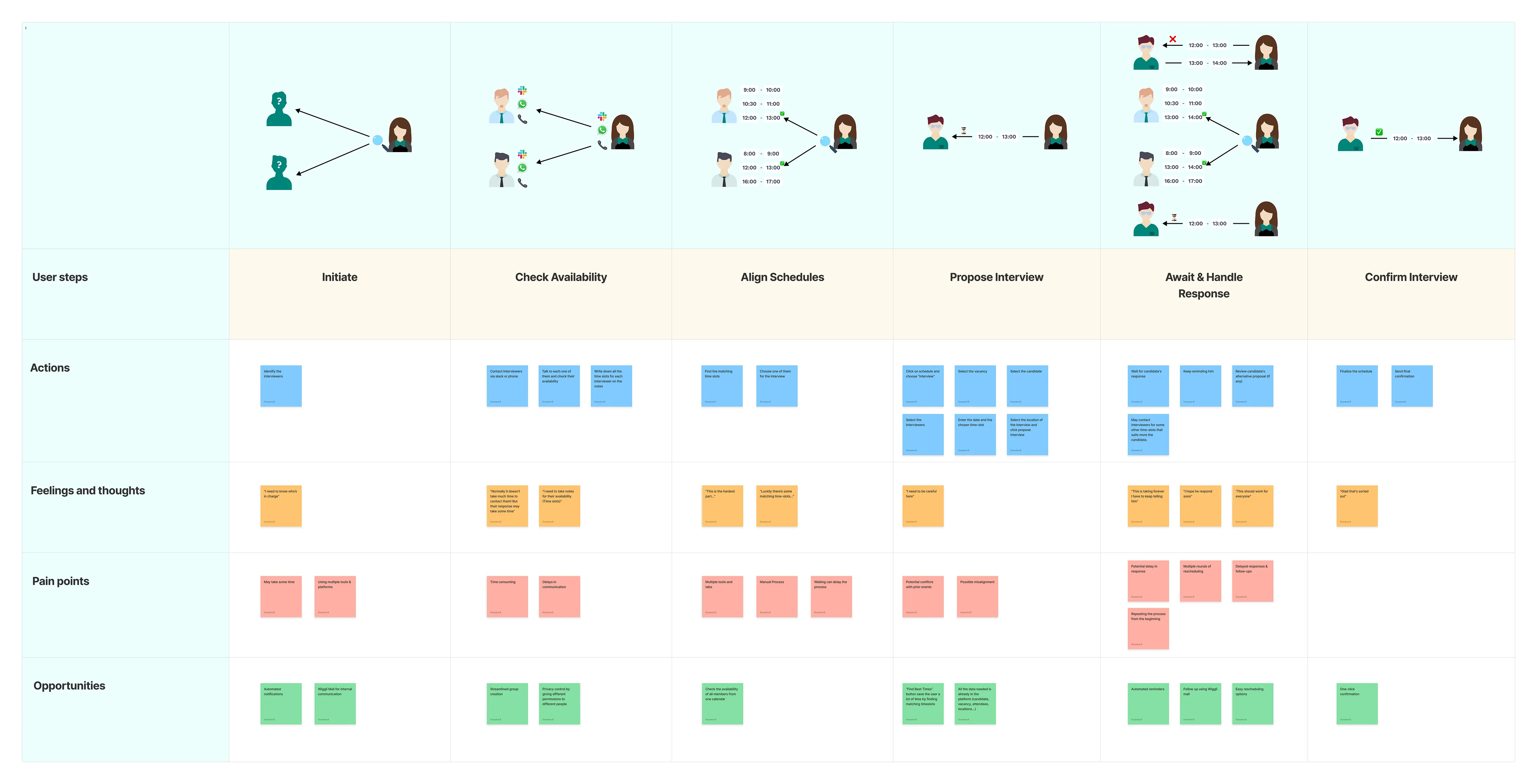
Service blueprint mapping the 6-stage hiring journey — Initiate, Check Availability, Align Schedules, Propose Interview, Await Response, Confirm Interview — with actions, feelings, pain points and opportunities per stage

2. The Core Problems Identified

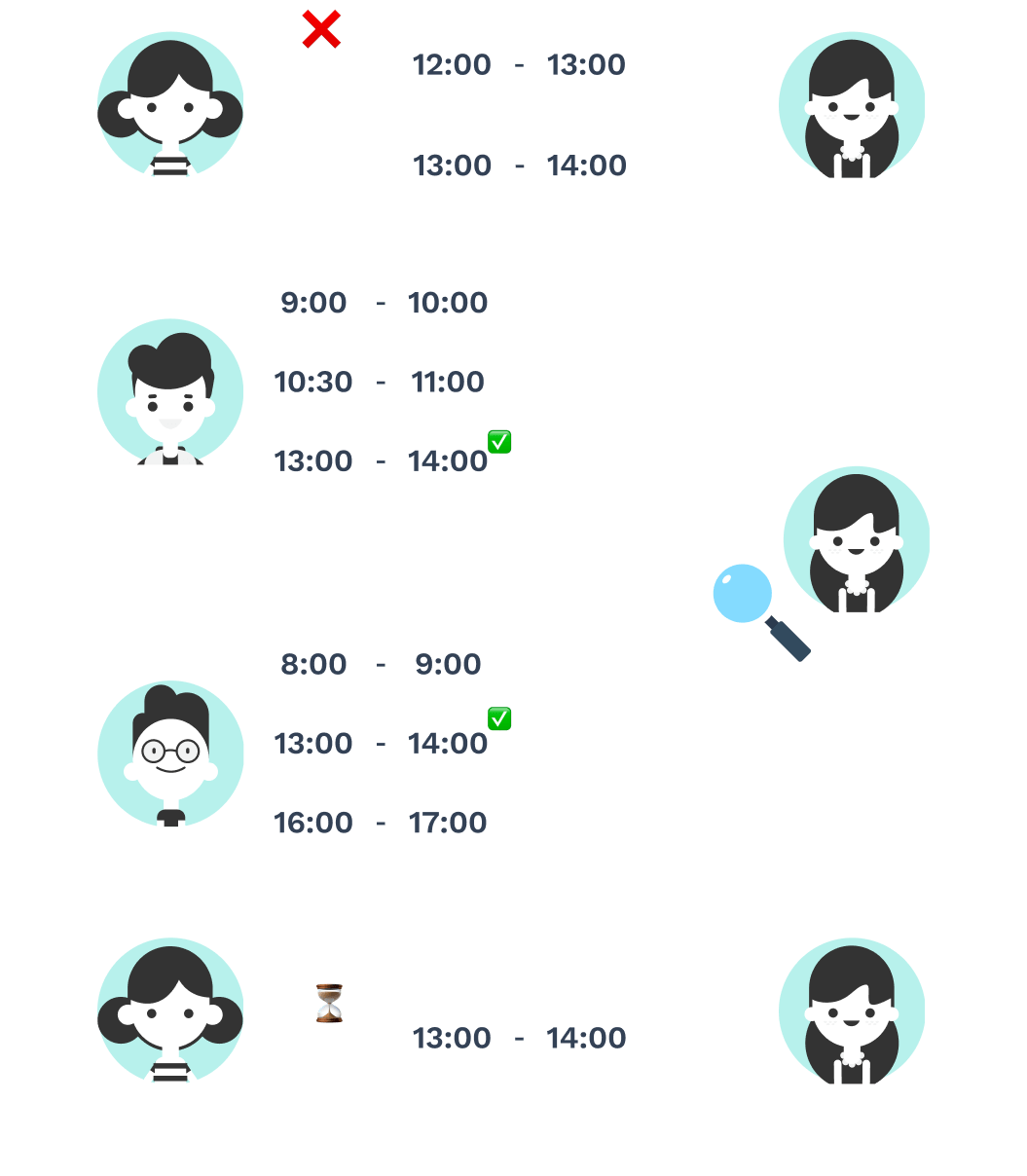
Diagram illustrating multi-party scheduling chaos: candidate, two interviewers and hiring manager exchanging conflicting time slots across email and messaging apps, causing 3-day booking delays
  • Communication Delays: The "ping-pong" between interviewers and candidates led to slow response times and necessitated frequent manual reminders.
  • Schedule Misalignment: Coordinating multiple interviewers without a unified view led to constant conflicts and rescheduling.
  • Tool Fragmentation: Recruiters were forced to use Slack, Email, WhatsApp, and Phone calls simultaneously, leading to confusion and high risk of miscommunication.
  • The Legacy UI Limitation: The old design only allowed proposing a single time slot, which was the primary driver of high rescheduling rates and candidate frustration.
  • Timezone Paralysis: For international teams, calculating offsets across GMT, EST, and CET led to frequent manual errors and wasted executive hours.
  • Cognitive Load: Recruiters were acting as manual "data routers," spending 5+ hours a week just moving calendar slots around.
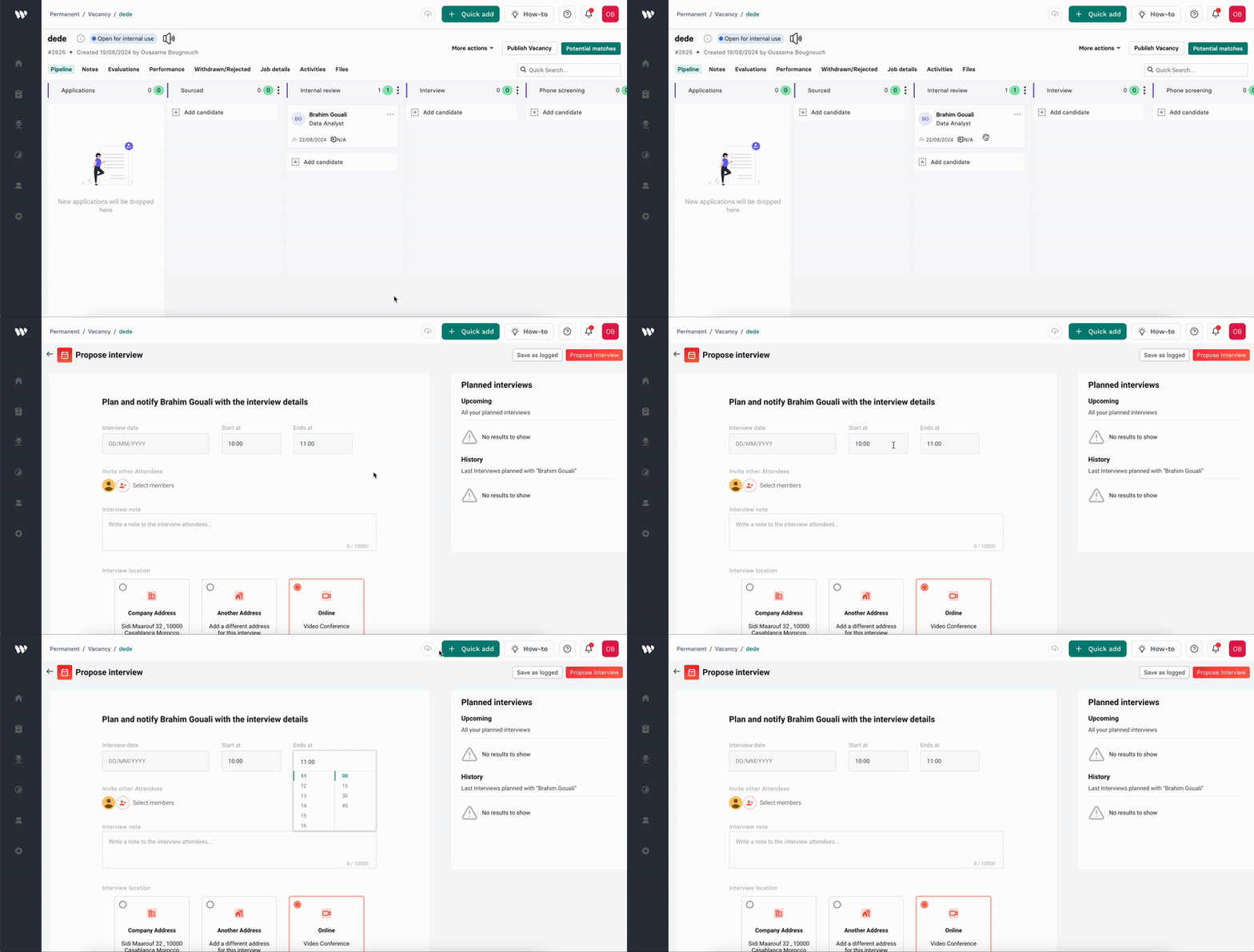
Screen recording of the legacy Wiggli interview scheduling UI, showing the limitation of proposing only a single time slot — the root cause of 40% candidate dropout The old design only allows proposing a single time slot, which leads to communication issues and increases the rescheduling rate.
The Solution: Collaborative Groups & Smart Scheduling

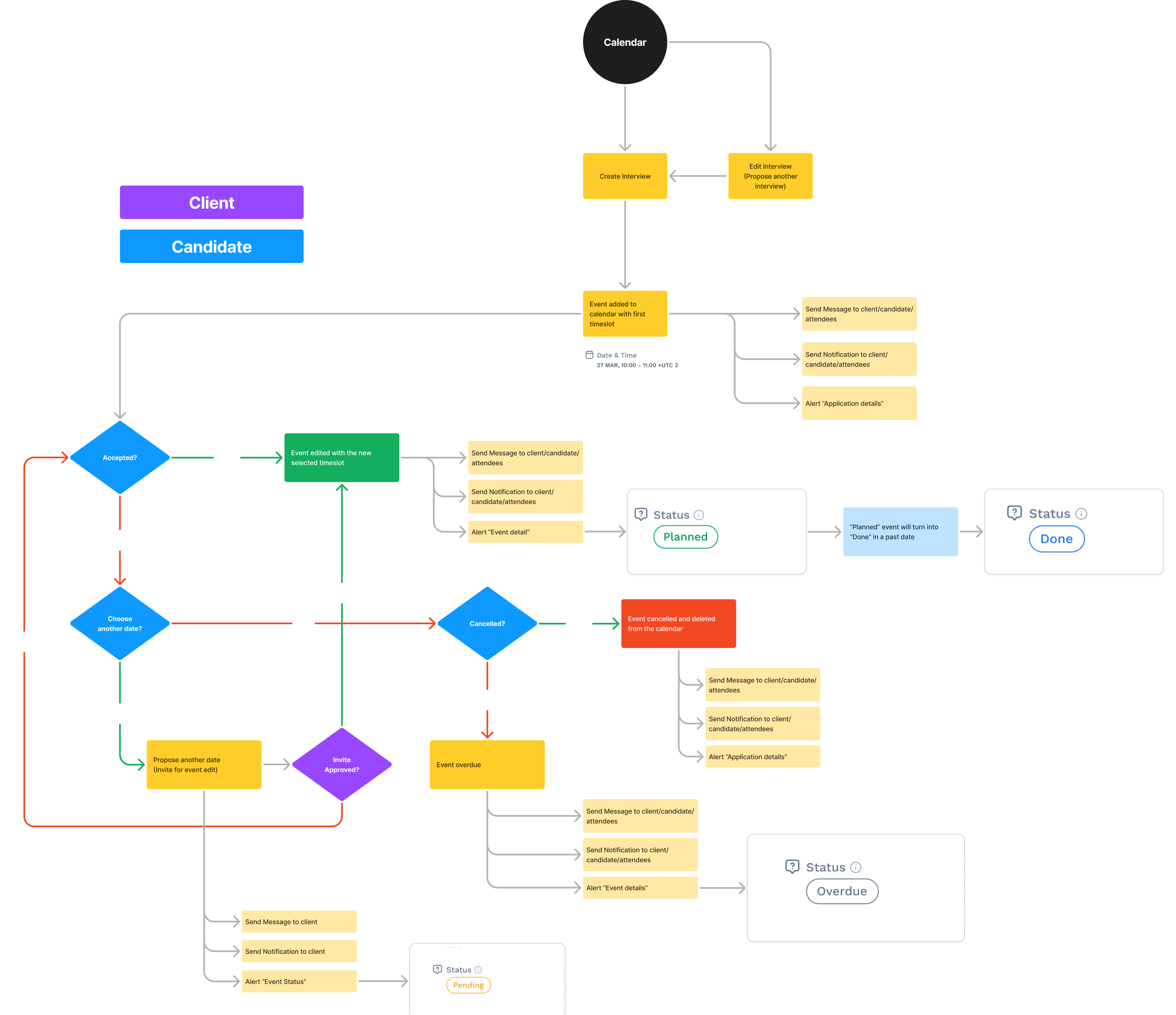
Based on the research, I developed a new user flow and concept centred around "Collaborative Groups" to streamline the scheduling process.

End-to-end user flow diagram for the redesigned Wiggli scheduling system covering Interview creation, Event setup, New Collaborative Group, Join Group, and Calendar Sync decision trees

1. Collaborative Groups

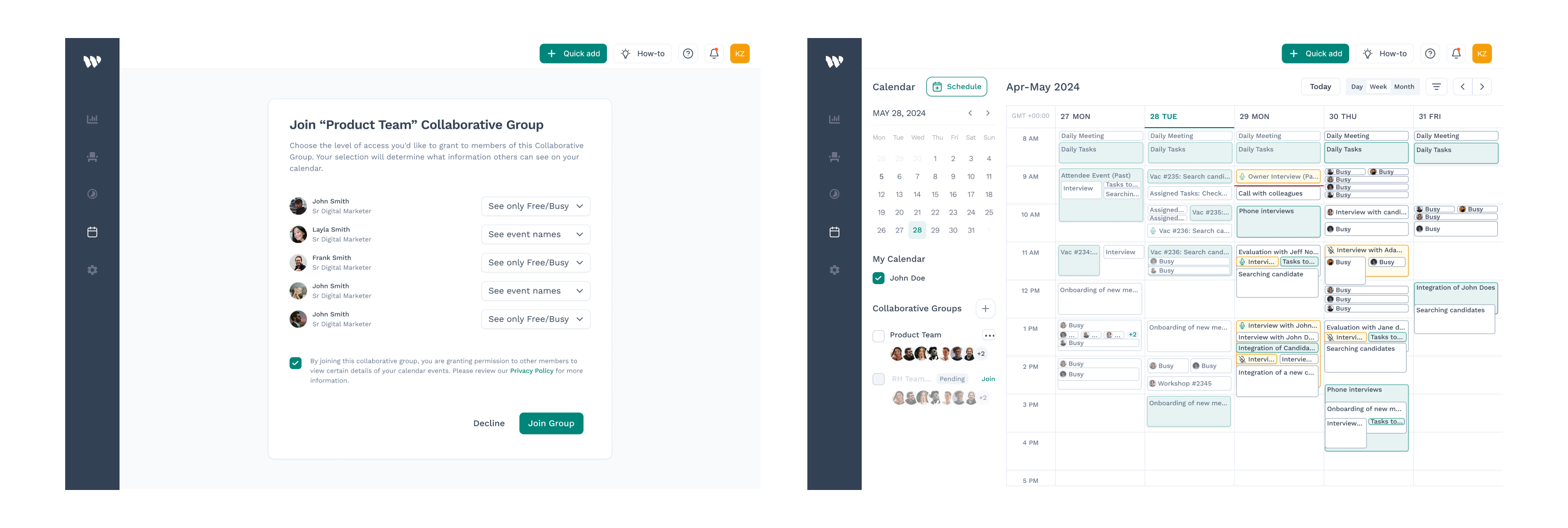
I designed a system where hiring teams can join a specific group for a vacancy. This centralizes the feedback loop and ensures that all stakeholders have the same view of the candidate's progress and the team's availability.

Wiggli Collaborative Groups feature UI — showing the Join Group permission modal alongside the shared calendar view where all team members' availability is visible in a unified weekly layout

2. "Find the Best Times" Engine

One of the standout features I designed is the "Find the Best Times" button.
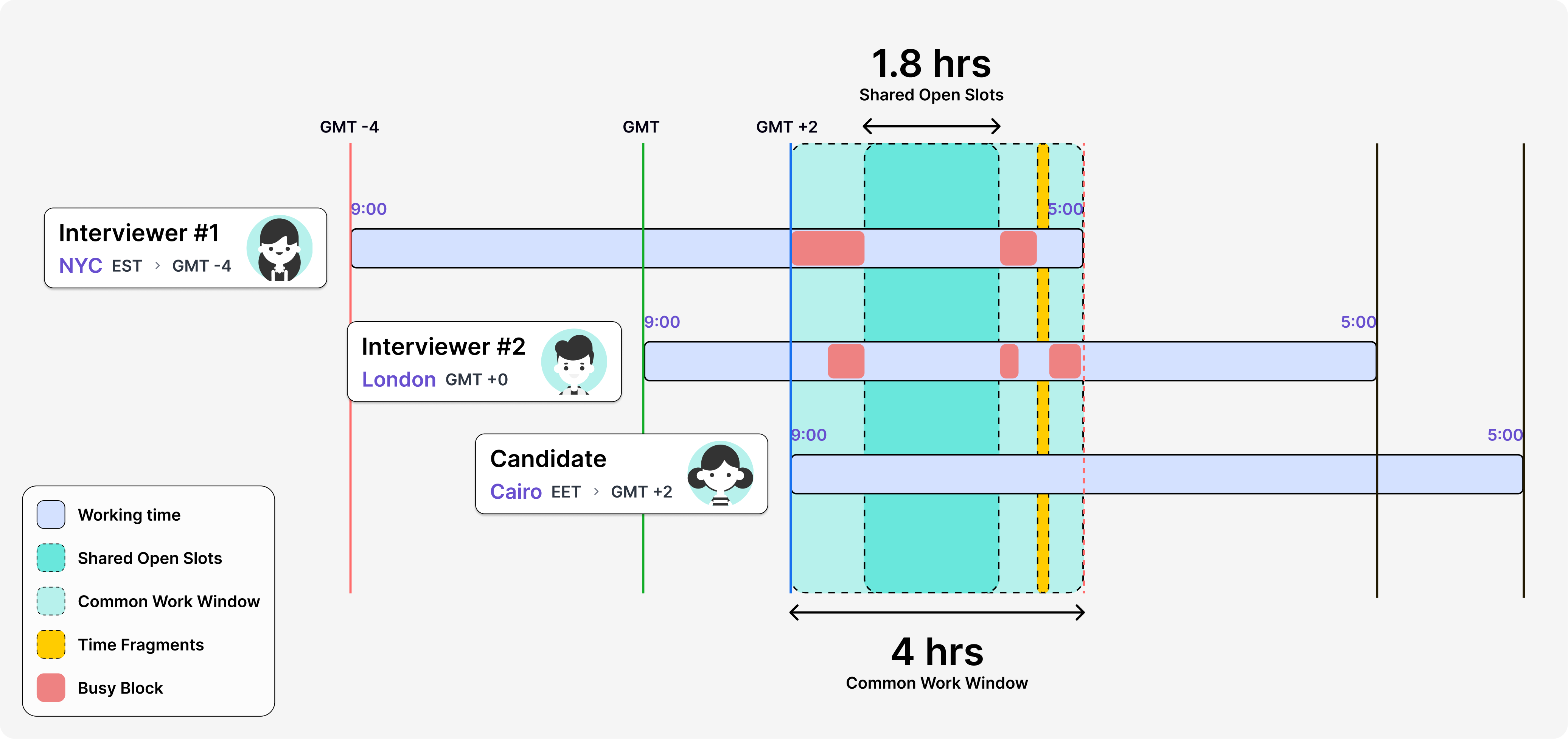
The "Find Best Times" feature is a logic layer that automates multi-participant scheduling math:

Multi-timezone availability intersection diagram showing how the Find Best Times engine identifies 1.8 hours of shared open slots within a 4-hour common work window across Interviewer in NYC (GMT-4), Interviewer in London (GMT+0), and Candidate in Cairo (GMT+2)

3. Flexible Calendar Architecture

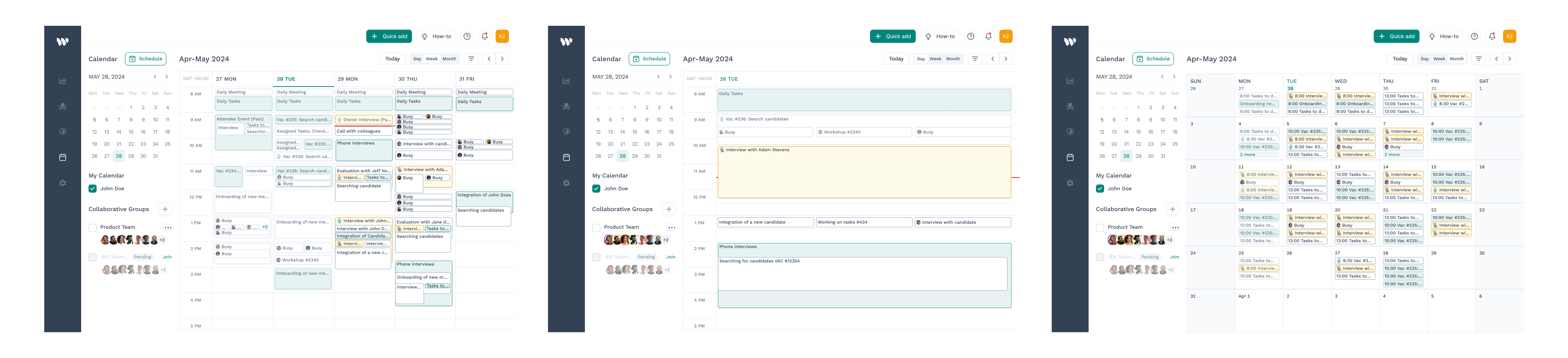
I designed three distinct views to cater to different planning needs:

Three Wiggli calendar layout variants side by side — Daily view for hour-by-hour scheduling, Weekly view for mid-term planning, and Monthly view for high-level hiring volume overview

4. Sync & Real-Time Alignment

I ensured the sync feature provided instant updates across all connected calendars (Google/Outlook), keeping internal teams perfectly aligned and eliminating double-booking errors.

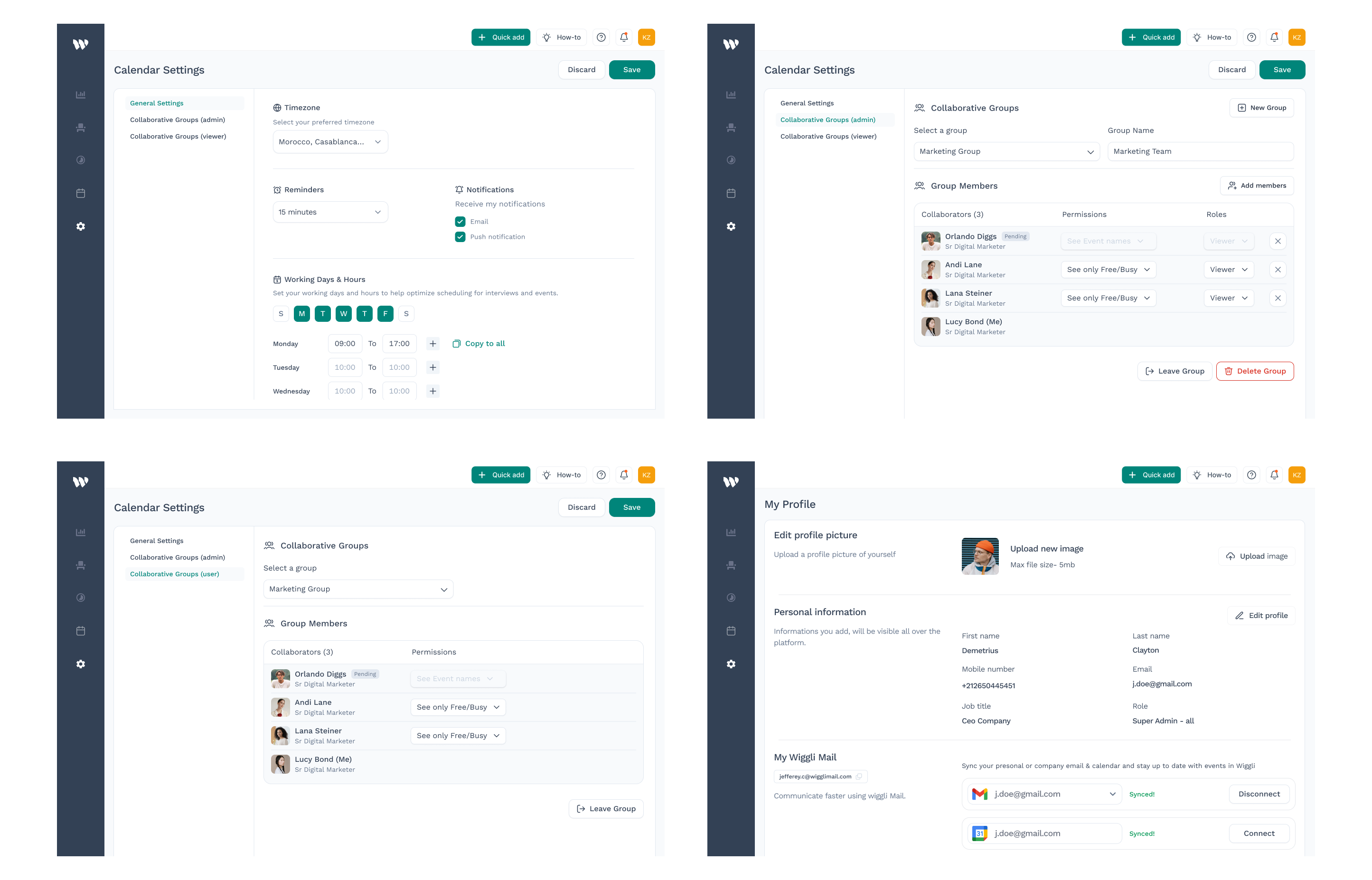
Wiggli Calendar Settings screen showing Google and Outlook sync configuration, Collaborative Groups management panel, and granular member permission controls (See Event Names, See Only Free/Busy)

5. The Notification Ecosystem

Implemented automated SMS and Email triggers for 24-hour and 1-hour pre-interview windows, with the option of adding multiple reminders, reducing no-shows by 46%.

Adoption & Change Management

  • Contextual Onboarding: Designed a Just-in-Time Onboarding Guide with contextual tooltips to flatten the learning curve without forced manuals.
  • Validation via Post-Task Survey (PTS): Achieved a 7.6/10 rating. Qualitative feedback led to the addition of a "Manual Availability Override" for high-priority executive hires.

Results & Iteration

The implementation was tracked via Wiggli’s reporting dashboard for 50+ active recruiters, proving that structural UX changes drive direct business ROI.

Metric Before After Growth Impact
Candidate Dropout 40% 12% 70% Friction Reduction
Scheduling Speed 3 Days ~15 Mins 90% Cycle Reduction
Operational ROI 5 hrs/wk < 1 hr/wk 20 hrs saved / month
Hiring Speed (TTF) 50 Days 35 Days 30% Faster Hiring
Rescheduling Rate 23% 6% Significant UX Improvement

Additional Measures

  • Rescheduling Reduction: Initial testing showed that the multiple-timeslot feature significantly reduced rescheduling rates by providing candidates with more flexibility.
  • Positive Coordination Feedback: Users reported that the Collaborative Groups feature greatly improved team alignment.

Continuous Iteration

Based on user feedback during testing, I identified a new requirement for a "Schedule Availability" feature. This allows recruiters to pre-mark their "free for interview" slots during busy seasons, further reducing friction in the planning stage.

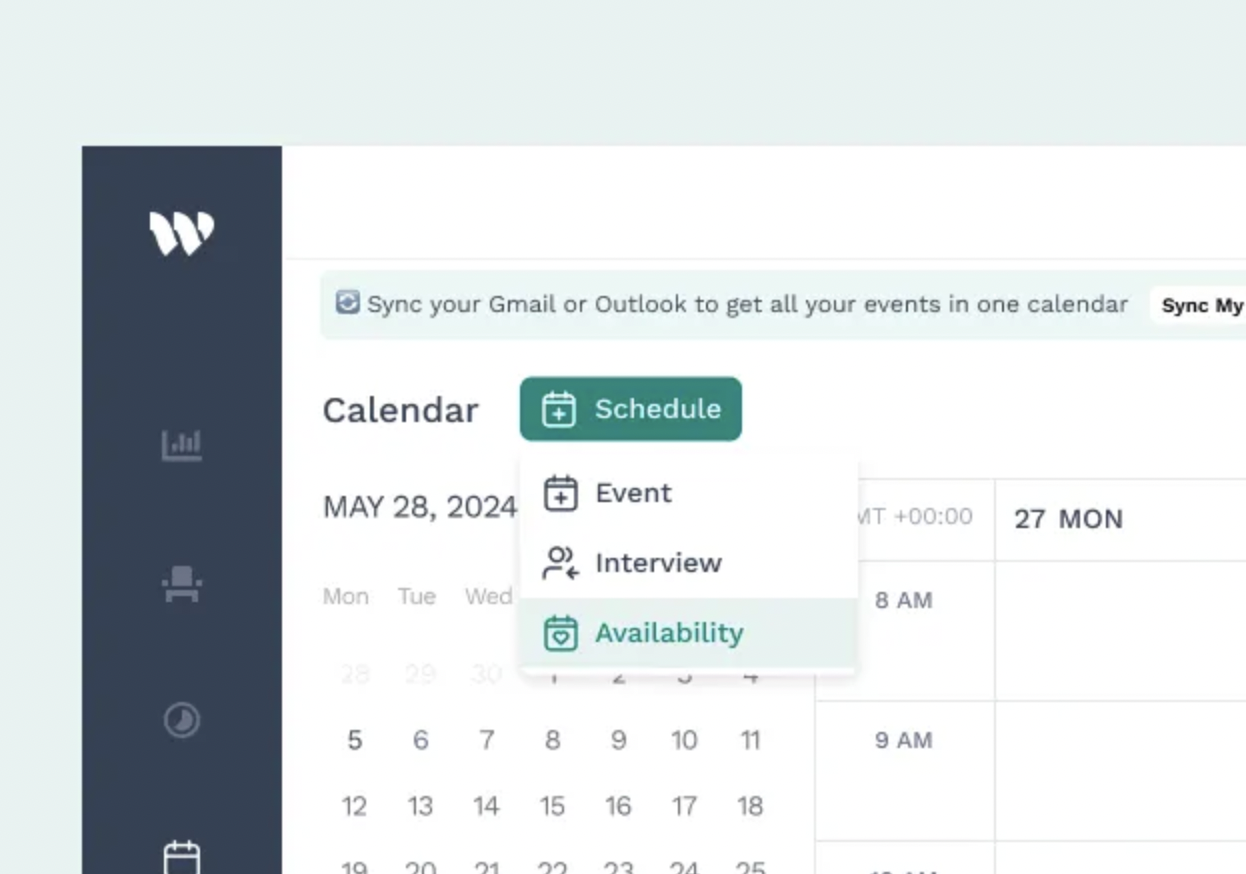
Wiggli Schedule Availability feature — Quick Add dropdown showing Event, Interview and Availability options, allowing recruiters to pre-mark free interview slots during busy hiring seasons

Conclusion

Working on Wiggli allowed me to build a tight feedback loop with the end users at Gentis. By transforming a chaotic journey involving five different communication platforms into a centralized, "Collaborative Group" experience, we didn't just redesign a calendar—we engineered a more efficient way for the organization to grow.